The AI Control Plane
Autonomous Google Apps Script Engine & Multi-System AI Pipeline
Executive System Overview
The AI Control Plane is an autonomous, serverless Google Apps Script engine that functions as my private Executive Assistant and Creative Director. Executing on a daily morning trigger, it triages unread Gmail threads, Google Calendar schedules, recent Drive projects, OpenWeather data for Falkirk, and live horoscopes synthesising them via Gemini 3.6 Flash into a beautifully styled HTML briefing delivered straight to my inbox.
This script engine laid the technical foundation that later evolved into Reclaim (The PWA Sanctuary OS).
Why I Built It: From Decision Fatigue to Code
I was learning Apps Script and had already built a script that could read my emails and update my calendar. But what I really needed was structure to my day. As a solo founder and mum raising three kids, opening a noisy inbox every morning created instant cognitive friction.
I started using Gemini's scheduled actions inside a long chat thread. Every morning before lifting my head off the pillow, I'd open the chat thread, tell Gemini to plan my day, confirm "yes" twice, and sync the scope to my calendar. But within a month, it stopped working so well, the long chat thread caused context drift and friction.
Instead of dealing with the hassle of chat-based scheduled actions, I wrote this standalone Google Apps Script.
Then came marketing. Building my portfolio and sharing what I do required consistent content. So I expanded the script to include social media prompts generating full captions, image concepts, and blog outlines across my three business pillars (Empower Virtual Assistant Services, Empower Automation, and Empower Digital Solutions).
The Daily Executive Briefing Email
The script generates a clean, modern HTML briefing sent directly to Gmail every morning. It structures the day into Biological Support, Movement & Errands, Zone Cleaning, Work Mode (10:00–18:00), Mum Mode (18:00–21:00), and Glow Up (21:00), alongside full social media captions and blog outlines.
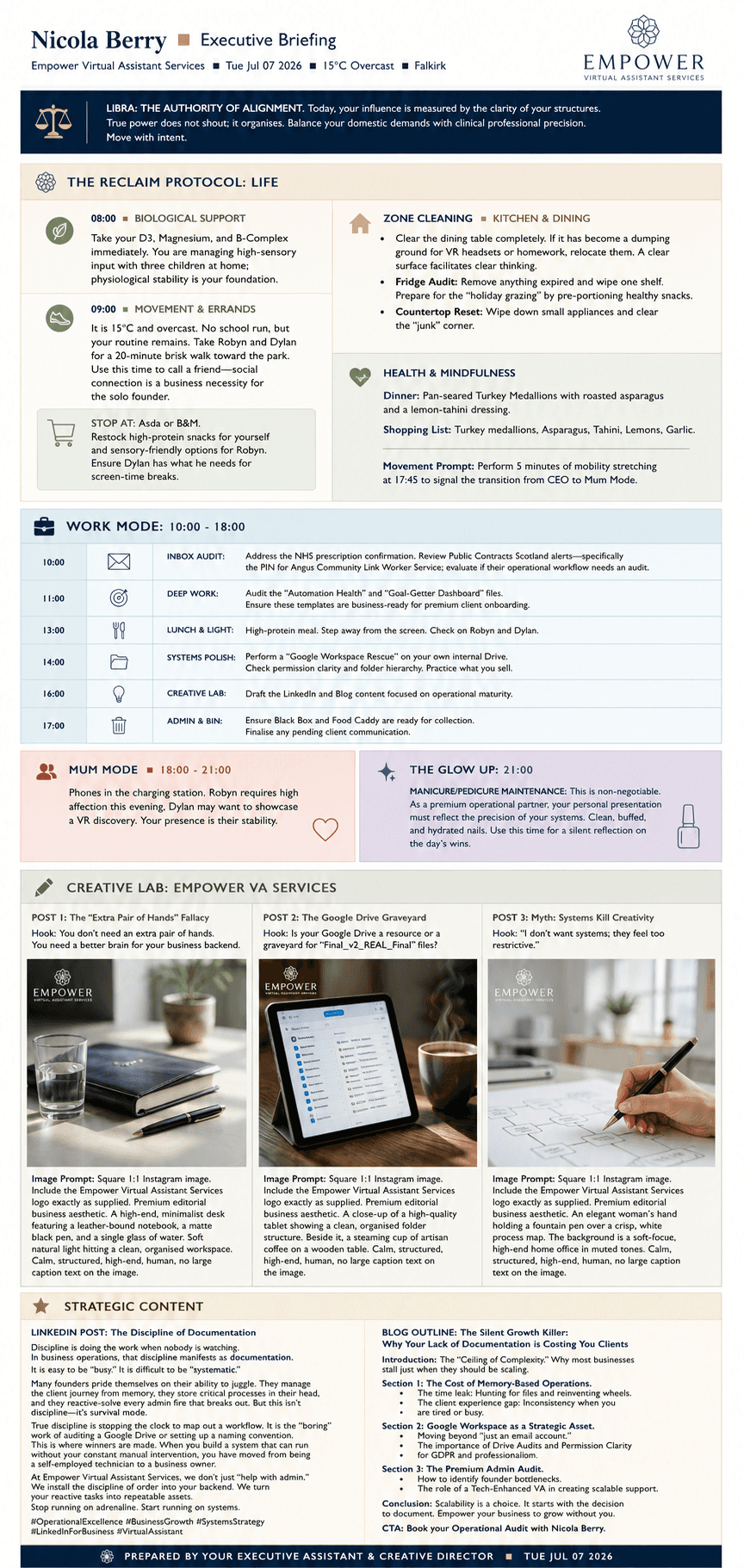
Figure 1: Full-length Executive Briefing Email delivered directly to Gmail at 8:00 AM
Automated Trello Content Pipeline
A downstream script reads the daily briefing email, parses the generated social media posts (captions, image prompts, and hooks), and automatically creates cards on a Trello board, categorised into posted & ideas lists across Empower VA, Automation, and Digital Solutions.
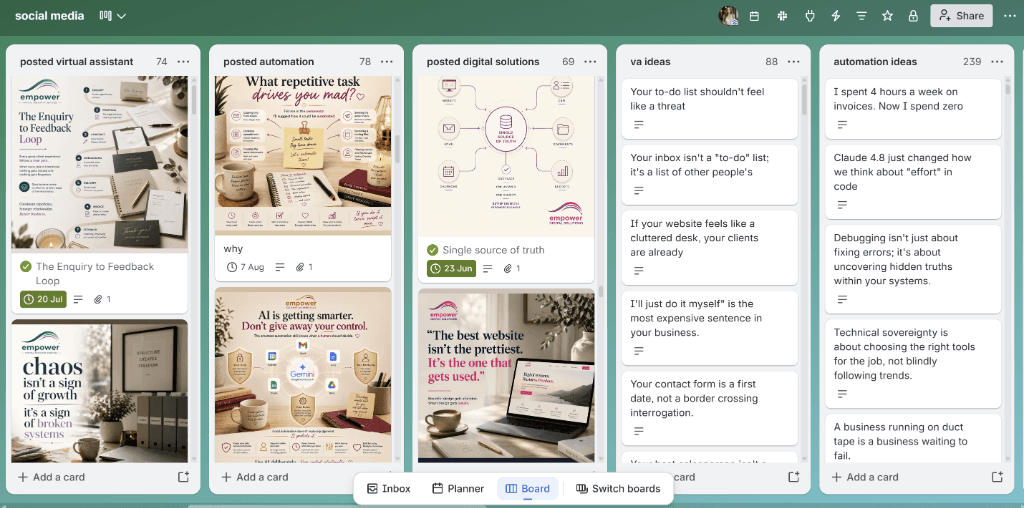
Figure 2: Automated Trello Content Board staged with image prompts, captions, and hooks
System Architecture & Data Flow
High-level technical architecture detailing input sources (Gmail, Calendar, Drive, OpenWeather), the Google Apps Script & Gemini 3.6 Flash processing engine, email output, API integrations, and the self-feeding Drive feedback loop.
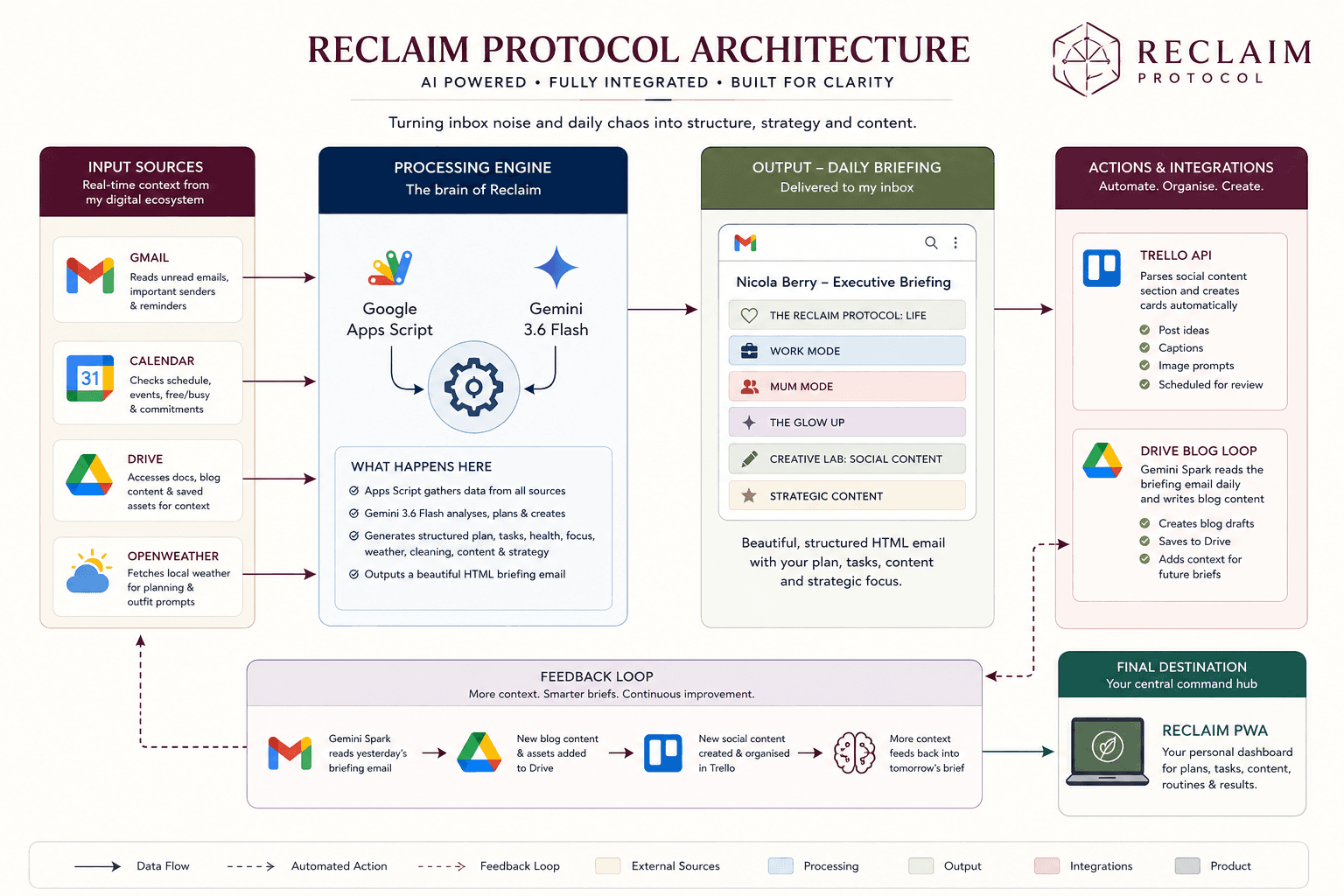
Figure 3: System Architecture & Automated Data Flow Protocol
The 4-Stage Connected Automation Pipeline
Executes `generateDailyBriefing()` using Gemini 3.6 Flash. Rotates 7 Zone Cleaning routines, 7 Glow-Up self-care rituals, 3 Content Pillars, and 7 Content Angles into a formatted HTML email.
A secondary Apps Script monitors incoming confirmation emails and automatically parses dates, titles, and details directly into Google Calendar.
Parses social media captions and image prompts from the email and calls the Trello API to automatically stage structured cards on the content board.
Gemini Spark reads the briefing email daily, writes complete blog articles for my websites, and saves them to Google Drive, which `getProjectContext()` then reads for tomorrow's brief!
Deep-Dive Journal Articles
Engineering the Sanctuary: Why I Built an AI-Native Executive Control Plane
How trying to use Gemini's scheduled actions led to chatbot drift and why pivoting to Apps Script + Gemini Flash created a zero-cost autonomous executive engine.
Replacing Myself with Code: The Apps Script Revelation
The moment I stopped being a task-taker and started being a systems builder by automating complex Google Workspace workflows into 2-second events.
From Script Engine to Full PWA Operating System
This Apps Script pipeline was so transformative in managing daily cognitive load that it became the core foundation for Reclaim, my full-stack React & PWA Sanctuary OS.